

This is the third in a series of three companion blog posts about dependency graphs. These blog posts explore the key terminology, graph theory concepts, and the challenges of managing large graphs and their underlying complexity.
- Introduction to the dependency graph
- Managing dependency graph in a large codebase
- The anatomy of a dependency graph
In the previous post, we took a closer look at some of the issues working in a large codebase in the context of the dependency graph. In this post, we are about to explore some concepts related to scale and scope of the dependency graph to understand its granularity and what really impacts your builds.
Dependency graph detail
When working on the source code, you likely think of dependencies in the graph as individual modules that import code from each other. When drawing a project architecture diagram, however, the individual files are likely to be grouped in packages to hide the individual files that a package consists of, primarily for brevity. Likewise, in build systems such as Bazel, you would often have one “node” in the dependency graph per directory. Of course, it wouldn’t be totally unreasonable to have a few of “nodes” that would represent a couple of packages in the same directory on disk. You could, for instance, store performance and chaos tests in the same directory, but have them modeled as individual units since they might have a different set of dependencies.
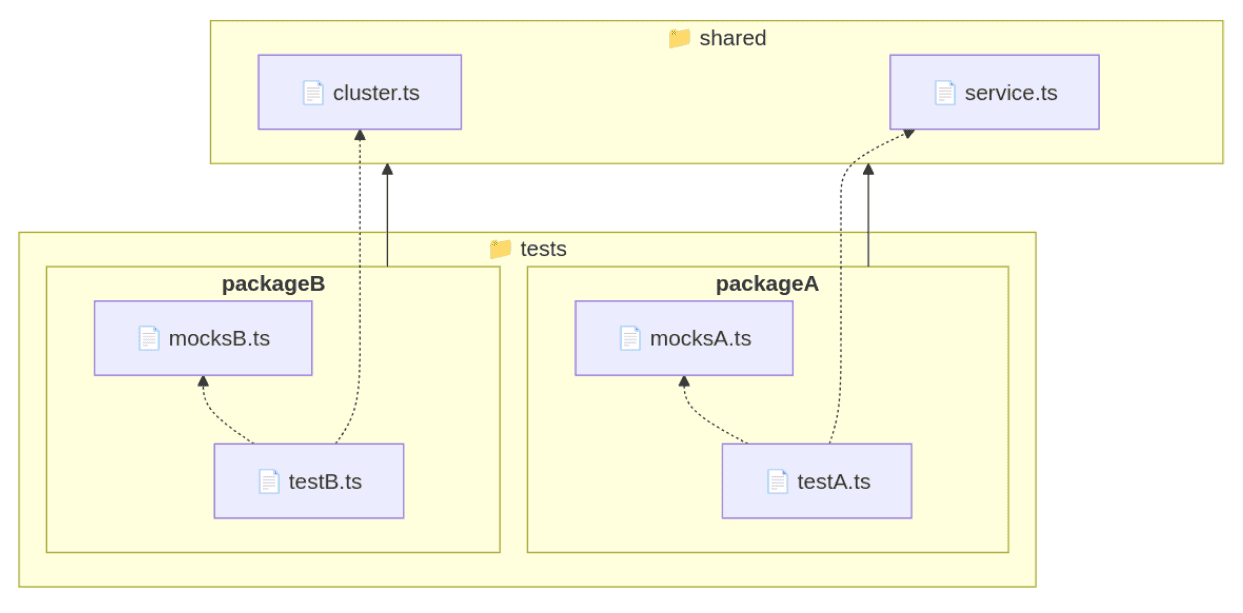
So while both packageA and packageB in the graph below depend on the package shared (solid lines),
we can see that individually, only testsA.ts depends on service.ts
and only testB.ts depends on cluster.ts (dotted lines).
If operating on packages level, the build metadata stored on disk in files would actually lead to construction of this dependency graph:
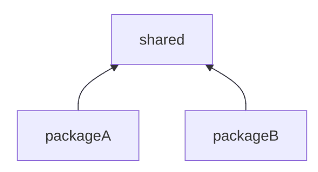
This means that whenever any file in the shared directory would change,
tests within both packages (A and B) would be considered impacted.
A build system that relies on dependency inference (such as Pants) is able to track dependencies across each file individually with the powerful concept of target generators. This means that every file in your project may be an individual node in the dependency graph with all the dependencies mapped out by statically analyzing the source code of the files and augmenting the build metadata manually where the inference falls short. In practice, this means that even though you can organize your code and specify dependencies at the broader package level — mirroring how you are likely to think about the project architecture and deliverable artifacts — Pants still provides the benefit of fine-grained recompilation avoidance. This reduces unnecessary rebuilds and test runs, shortens feedback cycles, and encourages better dependency hygiene — all without forcing you to manage dependencies at a per-file level manually. It might also provide better incentive for engineers to care more about dependencies in files individually which can be harder to achieve if a file is part of a build target with lots of other files with many dependencies.
Intuitively, one may want to go with as fine-grained dependency graph as possible hoping to avoid unnecessary build actions. For big repositories, however, the granularity of build targets often doesn’t matter as much as it does for smaller projects. This is because doing distributed builds across multiple machines would immediately require presence of a shared cache to be able to track results of any previously executed build actions that could be reused (such as compilation or linking). It is not immediately obvious, though, what operation would complete faster — rebuilding an entire directory (using packages as nodes) or querying the cache on the network for each individual file (using files as nodes) with the ambition to invoke only truly required build actions.
Dependency graph scope
With source code modules or packages being nodes, what are other types of dependencies that also contribute to the dependency graph? Almost any project relies on third-party libraries which might be available in version control or are to be downloaded from some kind of binary repository at build time when the dependency graph needs to be constructed. The same applies to any static resources and data your applications might need to be built or to run.
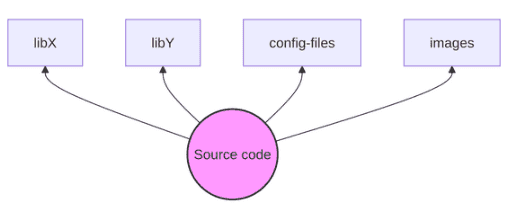
These are called explicit dependencies because users declare them in the build metadata.
In some build systems, such as Bazel, only a subset of dependencies, typically the ones you explicitly declare,
are fully tracked, while others may be left to the surrounding system.
These become implicit dependencies, because the build system relies on their presence without explicitly encoding them.
For example, your application might link to libcurl, which in turn depends on OpenSSL.
In some environments, OpenSSL is provided by the system rather than the build metadata, making it an implicit dependency.
Note that in other systems, like Nix, the complete transitive dependency graph is fully encoded,
so this distinction does not always apply.
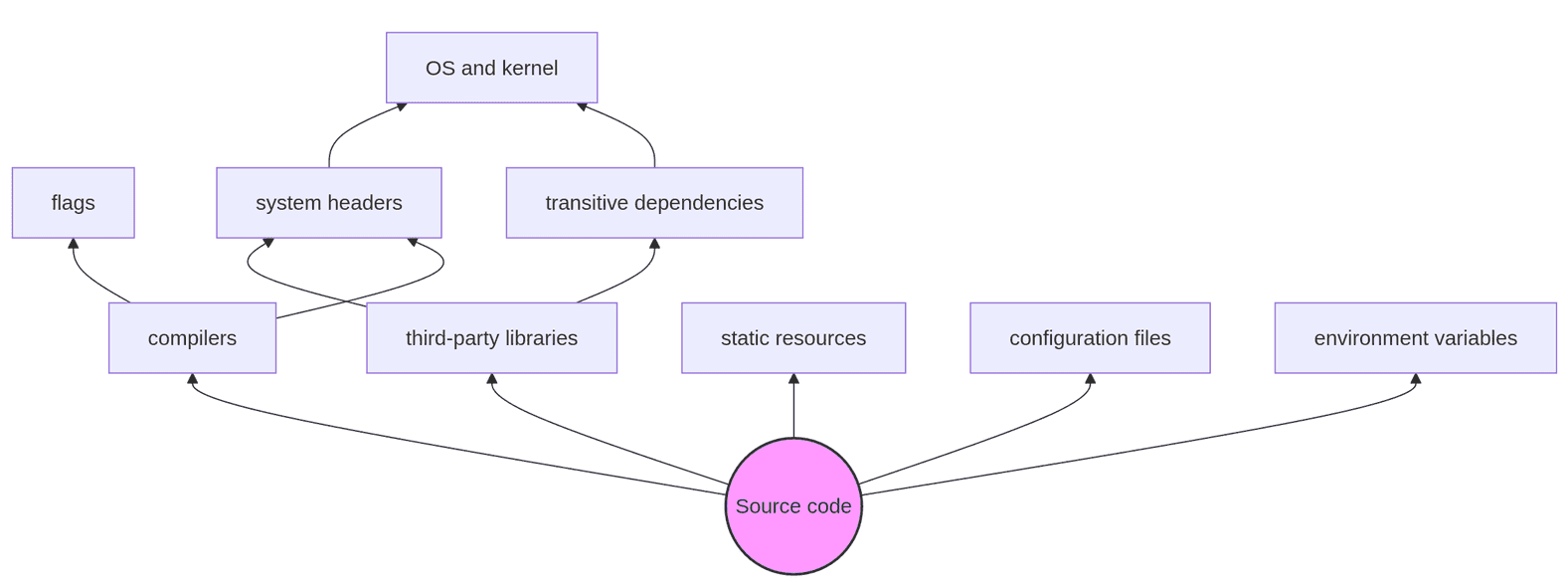
Apart from those, there are implicit dependencies which bind your code to build-time dependencies
such as a compiler.
In addition to saying that your source code (say, a C++ application) depends on a compiler,
it also depends on the compiler’s runtime libraries such as libstdc++ or libc++, an assembler,
and a linker.
Depending on the build system used and how your build workflow is configured,
the connection between build targets and the compilers might be recorded.
For example, in Bazel, it is documented that when processing build metadata for C++ sources, a dependency
between each source unit and a C++ compiler is created implicitly.
Any configuration such as options passed to the compiler (copts among other inputs) matters, too,
just as any environment variables you might have set in the build environment.
You wouldn’t probably think of compiler flags as something your application’s logic might depend on,
but some optimizations like inlining can make the performance of your application worse in certain situations.
Take a look at the Compiler Upgrade use case
from the Software Engineering at Google book to appreciate
how critical compilers are in a large codebase context.
Transitively, the compilation would also typically depend on system headers and libraries
such as libc (e.g., glibc), a C library used for system-level functionality
(unless you are able to link against musl libc, which is designed for static linking).
For instance, a binary compiled with glibc 2.17 might not run on a system with glibc 2.12
because the system may lack the required symbols.
How far can one go? In addition to the build dependencies —
everything that might be needed to build your application — one could argue
that libraries your compiled application needs to run might also be part of the dependency graph
as ultimately this is what’s necessary for this application to be useful to the end user.
For example, you can run ldd <yourbinary> in Linux (or otool -L on a macOS device)
to take a peek at shared object dependencies your binary might have.
Taking it to the extreme, if your application accesses Linux kernel features such as ioctl in unsupported or undocumented ways, the kernel version might matter, too. Driver interfaces can change between kernel versions, breaking user-space tools, so the operating system version along with the underlying kernel version are technically part of the dependency graph, too:
So far, we have looked at the dependency graph in one dimension only. However, it’s not uncommon to have conditional dependencies particularly when doing cross-compilation or producing artifacts for multiple environments. For instance, the backend system of the matplotlib visualization library is chosen based on the platform and available GUI libraries, which affects what transitive dependencies are going to be pulled when being installed. Imagine building your application for various CPU architectures (x86_64 or ARM) or a package for different operating systems (Linux or Windows) and the graph complexity explodes.
A typical approach to “freeze” the build environment and treat it as an immutable set of instructions is to provide a “golden” Docker image where you can find the build dependencies that are known to produce the correct artifacts. They are baked in and then all the build actions are taking place within containers spun from that image. This is a lot better than relying on the host, but this solution has a number of drawbacks as it forces you to treat all your dependencies as a single blob — an image. Making changes and experimenting is not encouraged as, from the dependency graph perspective, every time you do so would rebuild the image, which doesn’t end up being the same bit-for-bit, so you need to “re-build” your whole project as it’s not known what exactly has changed and what part of your project depends on it.
To focus on build-time dependencies only, even documenting (not mentioning properly declaring!)
all the inputs necessary to build your application is not a trivial task.
Using tools such as nix and NixOS to drive the build workflow is appealing,
as it makes it possible to describe practically all inputs to your build,
though, admittedly, this can require a significant investment from your engineering organization (but we can help you with it).
The least one can do is to be aware of the implicit dependencies even if properly describing them in build instructions is not immediately possible. No matter what approach is taken, any implicit relationship between your code and some other dependency that can be expressed in build metadata gets you closer to a fully declared state even if achieving it might be impossible in practice.
In the next post, we’ll explore some graph querying techniques that can help with related test selection, code review strategy, and more.
Behind the scenes
Alexey is a build systems software engineer who cares about code quality, engineering productivity, and developer experience.
If you enjoyed this article, you might be interested in joining the Tweag team.


