

We released Nickel 1.0 in May 2023. Since then, we’ve been working so hard on new features, bug fixes, and performance improvements that we haven’t had the opportunity to write about them as much as we would’ve liked. This post rounds up some of the big changes that we’ve landed over the past few years.
New language features
Algebraic data types
The biggest new language feature is one that we have actually written
about
before: algebraic data types — or enum variants in Nickel terminology —
first landed in Nickel 1.5. Nickel has supported plain enums
for a long time: [| 'Carnitas, 'Fish |] is the type of something that
can take two possible values: 'Carnitas or 'Fish. Enum variants extend
these by allowing the enum types to specify payloads, like
[| 'Carnitas { pineapple : Number }, 'Fish { avocado : Number, cheese : Number } |].
Types like this are supported by many modern programming languages, as
they are useful for encoding important invariants like the fact that carnitas
tacos can be topped with pineapple but not avocado. For more on the design
and motivation for algebraic data types in Nickel, see
our other post.
Pattern matching
Nickel has had a match statement for a while, but it used to be quite limited.
Nickel 1.5 and
Nickel 1.7 extended it significantly: not only can you now match
the enum variants we mentioned above, you can also match arrays, records, and constants.
You can also match the “or” of two patterns, and you can guard matches with predicates.
match {
  'Carnitas { pineapple } if pineapple >= 5 => std.fail_with "too much pineapple",

  [ 'Carnitas { .. }, 'Fish { .. } ]
  or [ 'Fish { .. }, 'Carnitas { .. } ] => "one of each",
}
Basically, if you’ve used pattern matching in another language then Nickel’s match blocks probably have the features you’re used to. And they’re adapted to Nickel’s gradual typing: the example match block above will work in dynamically typed code, but in a statically typed block it will fail to typecheck, because there’s no static type that can be either an enum or an array.
Field punning
Records in Nickel are recursive by default, meaning that in the record
{
  tacos = ['Carnitas { pineapple = 2 }],
  price = price_per_taco * std.array.length tacos,
  price_per_taco = 5,
}
the name price_per_taco in the definition of price refers to the field
price_per_taco defined within the record. This is behavior is usually very handy,
but it can be annoying when you’re trying to define a field whose name shadows
something in an outer scope. For example, suppose you want to move the definition
of tacos outside the record:
let tacos = ['Carnitas { pineapple = 2 }] in
{
  tacos = tacos,
  price = price_per_taco * std.array.length tacos,
  price_per_taco = 5,
}
This probably doesn’t do what you want: it recurses infinitely, because
in the tacos = tacos line, the tacos on the right side of the equals
sign refers to the name tacos that’s being defined on the left hand side
(and not, as you might expect, the tacos in let tacos = ... in).
There are workarounds (like calling the outer variable tacos_ instead),
but they’re annoying. Nickel 1.12 added the include keyword,
where { include tacos } means { tacos = <tacos-from-the-outer-scope> }.
Let blocks
Nickel binds local variables using a let statement, as in let x = 1 in x + x. Before Nickel 1.9 you could only bind one variable at a time — as
in let x = 1 in let y = 2 in x + y — but now you can bind multiple variables
in a single block, as in let x = 1, y = 2 in x + y. In most situations this is
just a small syntactic convenience,1 but with recursive let
blocks you actually gain some expressive power. For example, they allow you to write
mutually recursive functions without putting them in a record (which used to be the
only way to create a recursive environment in Nickel):
let rec
  is_even = fun x => if x == 0 then true else is_odd (x - 1),
  is_odd = fun x => if x == 0 then false else is_even (x - 1),
in
  is_even 42
Better contract constructors
Custom contracts were reworked in Nickel 1.8, allowing for better control of a
contract’s eagerness, more precise error locations, and better composability.
Nickel’s standard library now offers three contract constructors. The
simplest is std.contract.from_predicate, which turns a predicate (of type Dyn -> Bool)
into a contract. std.contract.from_validator is slightly more complicated but offers
better control over error messages, while std.contract.custom offers the most control.
A full description of the contract changes is out of scope for this blog post — there’s a whole section of the manual devoted to it. But the key point is that contracts in Nickel are partly eager and partly lazy. For example, the contract in
let Taco = [| 'Carnitas, 'Fish |] in
let tacos | Array Taco = ['Carnitas, 'CrunchyTacoSupreme] in
<something>
gets applied in two stages. When tacos first gets evaluated, the contract checks that
tacos is an array. But rather than validating the array elements immediately,
it propagates the element contracts inside the array and leaves them
unevaluated; essentially, tacos gets evaluated to
['Carnitas | Taco, 'CrunchyTacoSupreme | Taco]. Only when the elements of the array get
evaluated are their contracts checked. In particular, if the array elements are
never actually evaluated (for example, if <something> is std.array.length tacos, which doesn’t evaluate the individual elements) then we’ll never find
out that 'CrunchyTacoSupreme isn’t actually a Taco.
The lazy/eager distinction has been part of Nickel’s built-in record and array
contracts since the beginning, but never fully exploitable by custom contracts.
The new std.contract.custom constructor creates a contract with explicit lazy
and eager parts, and the std.contract.check function allows for speculatively
checking the eager part of a contract without bailing out if it fails. Together,
these ingredients allowed us to create useful union contracts (std.contract.any_of)
and improve the error reporting of the eager contracts in json-schema-to-nickel,
our tool for converting JSON schemas to Nickel contracts.
Performance improvements
For Nickel 1.0, we were focused on getting the basic language right. Since then (and especially over the past year), we’ve been working on getting the interpreter to run faster. While the performance improvements you observe will depend heavily on your use case, we’ve seen large user-provided Nickel configurations that evaluate 10x faster now than they were two years ago (and 3x faster than six months ago). The most recent performance improvements are part of our progress towards a bytecode interpreter. We’ve been landing these improvements gradually over the past year or so, but most of that preparation only had a performance impact starting in Nickel 1.15.
Standard library improvements
Nickel’s standard library has roughly doubled in size since Nickel 1.0, offering many useful
utility functions (like std.record.get_or or std.string.find_all) and contract combinators
(like std.contract.Sequence or std.contract.any_of). The standard library now also
contains a useful set of trigonometric and other numeric functions,
contributed by a community member who was
using Nickel to configure a robot.
Tooling and distribution improvements
Nickel has seen many improvements that are not directly tied to the Nickel language itself.
Language server improvements
Nickel’s language server (NLS) has seen many improvements, especially in Nickel 1.2 and 1.3. It now supports finding references and definitions, listing symbols, and various other table-stakes language server features. Completions have also been improved substantially since version 1.0, and can make intelligent use of type- and contract-related information. For example, in
'Carnitas { ‸ } | [| 'Carnitas { pineapple : Number }, 'Fish { avocado : Number, cheese : Number } |]
#           └── cursor is here
NLS knows to offer “pineapple” as a completion, but not “avocado”.
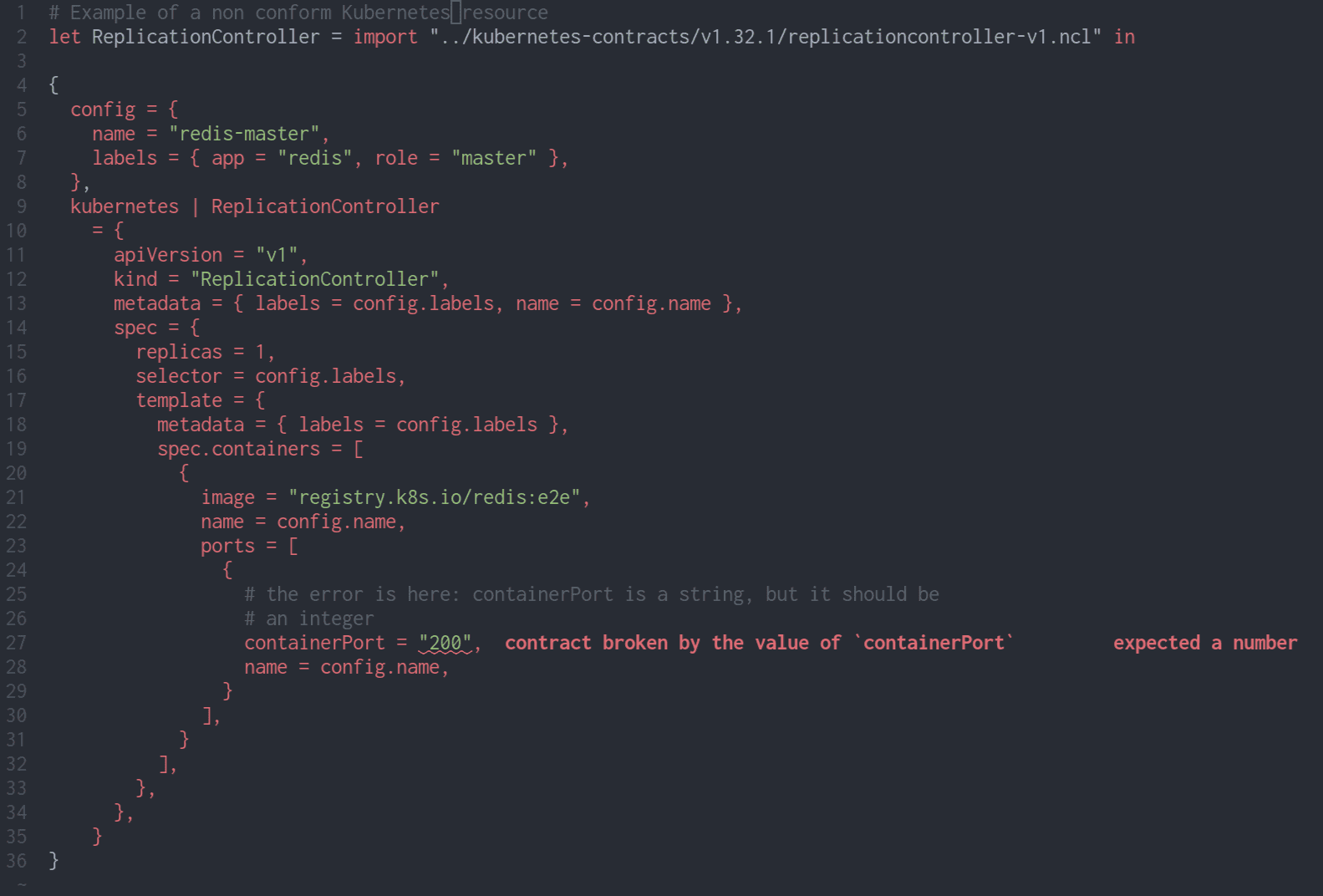
NLS has also gained the ability to offer diagnostics for evaluation errors. This is very useful in Nickel because contract errors are detected during evaluation instead of during typechecking. In-editor detection of contract violations is part of the vision articulated in a previous blog post, where configuration errors are left-shifted (because you get them as you type) and infinitely customizable (because contracts are arbitrary code). Since the previous post was written, the diagnostics have been further improved thanks to the contract improvements mentioned above: the problematic field now gets highlighted directly.
Unit tests
Since Nickel 1.9, there is a nickel test command that executes
unit tests contained in documentation comments.
{
  more_avocado
    | doc m%"
      Double the avocado!

      Here's an example that is automatically treated as a unit test:
      ```nickel
        more_avocado ('Fish { avocado = 1 })
        # => 'Fish { avocado = 2 }
      ```
      "%
    = fun ('Fish { avocado = a }) => 'Fish { avocado = 3 * a }
}
Running nickel test on this file will highlight the typo in the
function definition:
testing more_avocado/0...FAILED
test more_avocado/0 failed
error: contract broken by a value
   ┌─ <unknown> (generated by evaluation):1:1
   │
 1 │ std.contract.Equal ('Fish { avocado = 2, })
   │ ------------------------------------------- expected type
   │
  <snip...>
   ┌─ input.ncl:12:38
   │
12 │     = fun ('Fish { avocado = a }) => 'Fish { avocado = 3 * a }
   │                                      ------------------------- evaluated to this expression

1 failures
error: tests failed
JSON/YAML/TOML interop
Interoperability with plain data formats (JSON, YAML, and TOML) has been improved in several ways.
- The YAML format allows for several YAML documents to be embedded in the
same file (separated by
---lines). We can read such files since Nickel 1.2, and we can write them since Nickel 1.15: from Nickel 1.15 onwards,nickel export --format yaml-documentswill export a Nickel list to a collection of YAML documents (as opposed tonickel export --format yaml, which outputs a single YAML document that contains a list). Similarly, Nickel 1.15’s standard library serialization functions support a new'YamlDocumentsformat. - The
nickel convertcommand, added in Nickel 1.15 allows conversion of JSON, YAML, or TOML to Nickel. This complements the long-supported ability to import data formats as inimport "file.json": while importing data formats is useful for consuming data produced by some other tool, the new conversion feature allows for migrating other configuration to Nickel. - Since Nickel 1.3, the
nickelcommand line will merge plain data files into Nickel code: if you have a JSON file containing{ "price_per_taco": 5 }and a Nickel file containing{ tacos = 3, price = price_per_taco * tacos, price_per_taco }thennickel export json_file.json nickel_file.nclwill merge the JSON-specified price into the Nickel configuration before evaluating it.
Release process and distribution
For the Nickel 1.0 release, we built binaries for Linux x86_64 and aarch64 only. Now, we’re building MacOS and Windows binaries as well. And we’re not the only distributors of Nickel binaries: nixpkgs, Arch Linux, and Homebrew all have up-to-date Nickel packages.
We’ve also improved the usage of Nickel as a library. Since Nickel 1.10, we’ve been publishing our Python bindings on PyPI. And Nickel 1.15 saw our first release of C and Go bindings, along with a stable Rust API.
Experimental features
Since 1.0, Nickel has grown a few experimental features for use cases that we want to enable but don’t yet have enough confidence in the design and implementation to fully support. Some of these features (Nix compatibility and package management) are disabled by default; you’ll need to build Nickel with explicit support for them. If you’re using any of these features, let us know what you’re doing with them and whether they’re working the way you want!
Customize mode
Sometimes, writing a new configuration file for one or two settings feels unnecessary.
Our “customize mode”, introduced in Nickel 1.2, allows configuration to be
supplied at the command line. For example, given the
{ tacos = 3, price = price_per_taco * tacos, price_per_taco } example from before,
we can evaluate it with
$ nickel export tacos.ncl -- price_per_taco=5
{
  "price": 15,
  "price_per_taco": 5,
  "tacos": 3
}
Also, if you aren’t sure what options are available for setting, you can ask:
$ nickel export tacos.ncl -- list
Input fields:
- price_per_taco

Overridable fields (require `--override`):
- price
- tacos

Use the `query` subcommand to print a detailed description of a specific field. See `nickel help query`.
Since Nickel 1.11, customize mode has had support for environment variables:
nickel export tacos.ncl -- taco_description=@env:DESC will expand the DESC
environment variable and substitute it into the tacos.ncl configuration.
In some cases, you could achieve something similar by expanding environment
variables using your shell, but correctly handling escaping there can be
painful (or even a security risk).
Nix compatibility
A lot of Nickel users are also Nix users, and so Nix interoperability is an often-requested feature. Our current Nix interface is limited to plain data, but you can import Nix from Nickel if you’ve built Nickel with the “nix-experimental” feature:
{
  price = price_per_taco * std.array.length (import "tacos.nix")
  price_per_taco = 5,
}
Package management
In Nickel 1.0, you could share code between projects by copying files around,
basically. Nickel 1.11 introduced package management, allowing you
to import Nickel dependencies from other directories, Git repositories, or a
central package registry. You declare your dependencies in a Nickel-pkg.ncl
manifest file:
{
  name = "tacos",
  authors = ["Me"],
  minimal_nickel_version = "1.15.0",
  dependencies = { salsa = 'Git { package = "github:example/salsa", version = "1.0" } },
}
Then you can import those dependencies in your Nickel code:
'Fish { avocado = 1, salsa = (import salsa).verde }Thank you!
That sums up the biggest changes to Nickel over the past two and a half years or so. As we come up on 5,000 commits from 86 contributors, we’d like to thank you for all the feedback, discussion, and participation that encourage us to keep improving Nickel.
- There are some situations where let blocks can improve
performance with Nickel’s current interpreter:
let x = 1 in let y = 2 in x + ycreates two nested environments whilelet x = 1, y = 2 in x + ycreates a single environment. Variable lookups are usually faster when environments are less deeply nested, so the version with a let block should be a little bit faster. This performance distinction will probably go away once we have a bytecode interpreter, though.↩
Behind the scenes
Joe is a programmer and a mathematician. He loves getting lost in new topics and is a fervent believer in clear documentation.
If you enjoyed this article, you might be interested in joining the Tweag team.


